10. Integration Guide
This guide is for developers who want to integrate the Amadeus Wallet Extension into their decentralized applications (dApps).
Overview
The Amadeus Wallet Extension provides a JavaScript API that dApps can use to interact with user wallets. This allows users to sign transactions and interact with smart contracts directly from web applications.
API Reference
Checking Wallet Availability
Before using the wallet API, check if it's available:
if (typeof window.amadeus !== 'undefined') {
	// Wallet is available
	console.log('Amadeus wallet detected')
} else {
	// Wallet not installed
	console.log('Amadeus wallet not found')
}
Requesting Accounts
Request access to user's wallet accounts:
try {
	const accounts = await window.amadeus.requestAccounts()
	console.log('Connected accounts:', accounts)
	// Returns: ['5KJvsngHeMoo884xkJ6Cyb5StvnRN6f9tYiqwqJzLpQq']
} catch (error) {
	console.error('Failed to connect:', error.message)
}
Response:
- Array of account addresses (Base58 encoded)
- User must approve connection request
- Returns current account if already connected
Signing Transactions
Sign a transaction request:
try {
	const result = await window.amadeus.signTransaction({
		contract: 'Coin',
		method: 'transfer',
		args: [
			'5KJvsngHeMoo884xkJ6Cyb5StvnRN6f9tYiqwqJzLpQq', // recipient
			'1000000000', // amount (in atomic units)
			'AMA' // token symbol
		],
		description: 'Send 100 AMA tokens'
	})

	console.log('Transaction signed:', result.txHash)
	console.log('Packed transaction:', result.txPacked)

	// Submit to blockchain
	// ... your submission logic
} catch (error) {
	console.error('Transaction rejected:', error.message)
}
Parameters:
contract(string): Contract name or addressmethod(string): Function name to callargs(array): Function argumentsdescription(string, optional): Human-readable description
Response:
txHash(string): Transaction hashtxPacked(Uint8Array): Packed transaction bytes
Event Listeners
Listen for wallet connection/disconnection:
// Listen for account changes
window.amadeus.on('accountsChanged', (accounts) => {
	console.log('Accounts changed:', accounts)
	// Update UI with new accounts
})

// Listen for disconnect
window.amadeus.on('disconnect', () => {
	console.log('Wallet disconnected')
	// Handle disconnection
})
Integration Examples
Basic Connection Flow
async function connectWallet() {
	try {
		// Check if wallet is available
		if (typeof window.amadeus === 'undefined') {
			alert('Please install Amadeus Wallet Extension')
			return
		}

		// Request accounts
		const accounts = await window.amadeus.requestAccounts()

		if (accounts.length === 0) {
			alert('No accounts found')
			return
		}

		// Use first account
		const userAddress = accounts[0]
		console.log('Connected:', userAddress)

		// Update UI
		updateUI(userAddress)
	} catch (error) {
		console.error('Connection failed:', error)
		alert('Failed to connect wallet: ' + error.message)
	}
}
Token Transfer Example
async function transferTokens(recipient, amount, symbol = 'AMA') {
	try {
		// Convert amount to atomic units
		const atomicAmount = toAtomicUnits(amount)

		// Request signature
		const result = await window.amadeus.signTransaction({
			contract: 'Coin',
			method: 'transfer',
			args: [recipient, atomicAmount.toString(), symbol],
			description: `Send ${amount} ${symbol} to ${recipient}`
		})

		// Submit transaction to blockchain
		const txResult = await submitTransaction(result.txPacked)

		console.log('Transaction submitted:', txResult.hash)
		return txResult
	} catch (error) {
		if (error.message === 'User rejected') {
			console.log('User rejected transaction')
		} else {
			console.error('Transfer failed:', error)
		}
		throw error
	}
}

// Helper function to convert to atomic units
function toAtomicUnits(amount) {
	return Math.floor(amount * 1e8) // 8 decimal places
}
Contract Interaction Example
async function callContract(contractAddress, method, args, description) {
	try {
		const result = await window.amadeus.signTransaction({
			contract: contractAddress,
			method: method,
			args: args,
			description: description || `Call ${method} on ${contractAddress}`
		})

		// Submit to blockchain
		return await submitTransaction(result.txPacked)
	} catch (error) {
		console.error('Contract call failed:', error)
		throw error
	}
}

// Example usage
await callContract('0x1234...', 'approve', ['0x5678...', '1000000000'], 'Approve token spending')
Error Handling
Common Errors
try {
  await window.amadeus.signTransaction({...})
} catch (error) {
  switch (error.message) {
    case 'User rejected':
      // User clicked reject
      console.log('Transaction rejected by user')
      break
    case 'Wallet is locked':
      // Wallet needs to be unlocked
      console.log('Please unlock your wallet')
      break
    case 'No accounts':
      // No accounts available
      console.log('Please connect your wallet')
      break
    default:
      // Other errors
      console.error('Error:', error.message)
  }
}
Best Practices
User Experience
-
Check Availability First
if (typeof window.amadeus === 'undefined') {// Show install prompt} -
Handle Rejections Gracefully
try {await window.amadeus.signTransaction({...})} catch (error) {if (error.message === 'User rejected') {// Don't show error, user intentionally rejectedreturn}// Show error for other cases} -
Provide Clear Descriptions
description: 'Send 100 AMA to Alice for payment'// Better than: 'Transfer' -
Show Loading States
setLoading(true)try {const result = await window.amadeus.signTransaction({...})// Handle success} finally {setLoading(false)}
Security
- Validate Inputs
- Verify addresses before requesting signatures
- Validate amounts and parameters
- Check contract addresses
- Handle Errors Properly
- Don't expose sensitive information
- Provide helpful error messages
- Log errors for debugging
- Verify Transactions
- Verify transaction hash after signing
- Check transaction status on blockchain
- Handle failed transactions
TypeScript Support
If using TypeScript, you can define types:
interface AmadeusWallet {
	requestAccounts(): Promise<string[]>
	signTransaction(params: {
		contract: string
		method: string
		args: any[]
		description?: string
	}): Promise<{
		txHash: string
		txPacked: Uint8Array
	}>
	on(event: string, callback: Function): void
	removeListener(event: string, callback: Function): void
}

declare global {
	interface Window {
		amadeus?: AmadeusWallet
	}
}
Testing
Testnet Testing
Always test on Testnet first:
- Ensure users are on Testnet
- Use Testnet tokens for testing
- Verify transactions on Testnet explorer
Mock Implementation
For development without extension:
// Mock wallet for testing
window.amadeus = {
	async requestAccounts() {
		return ['5KJvsngHeMoo884xkJ6Cyb5StvnRN6f9tYiqwqJzLpQq']
	},
	async signTransaction(params) {
		console.log('Mock signing:', params)
		return {
			txHash: 'mock-hash',
			txPacked: new Uint8Array()
		}
	},
	on() {},
	removeListener() {}
}
React Integration Example
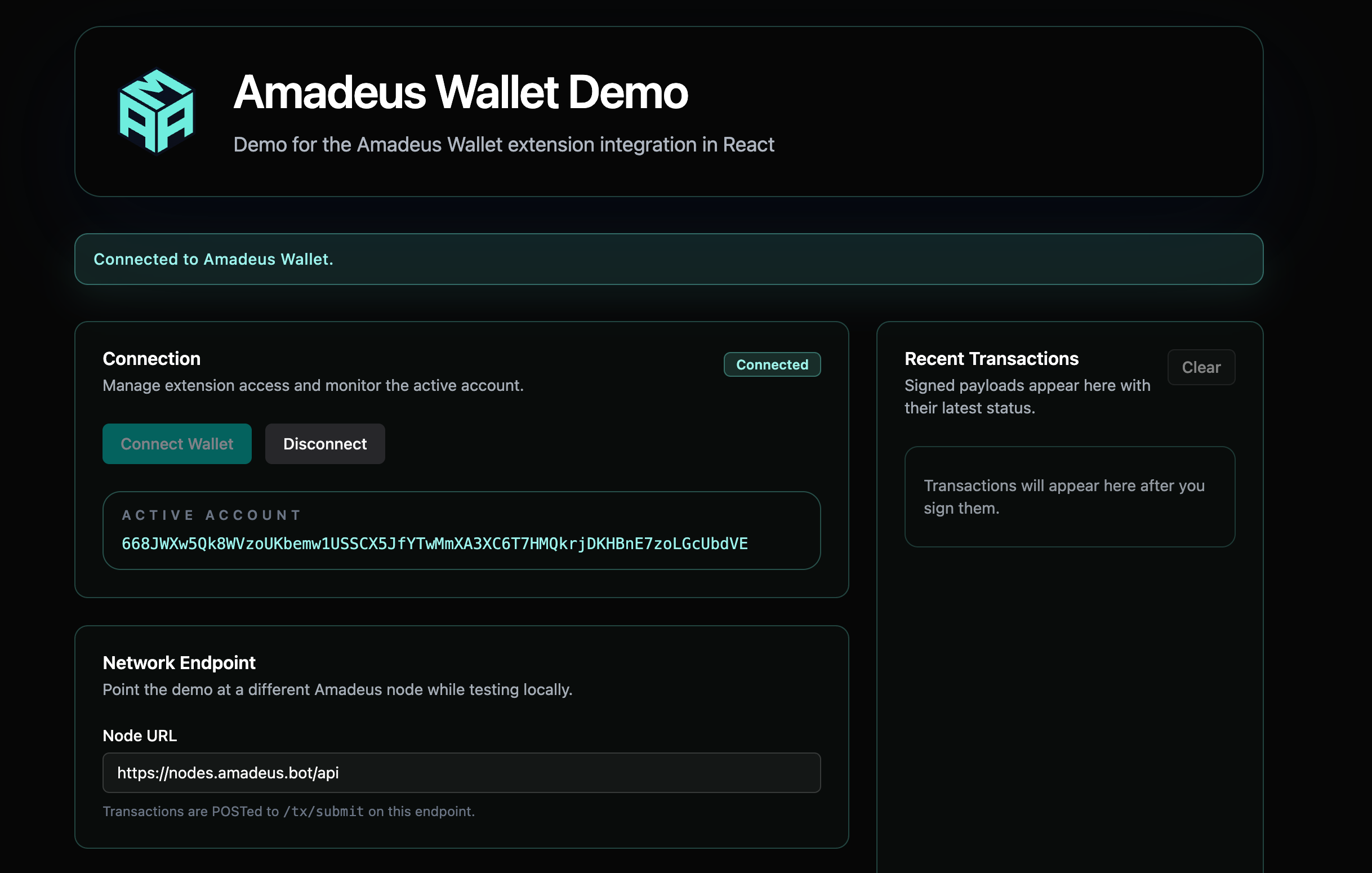
We provide a complete React + TypeScript demo application that showcases how to integrate the Amadeus Wallet Extension into a modern React application.
Repository
GitHub: amadeus-wallet-extension-react-demo
Live Demo: amadeus-wallet-extension-react-demo.vercel.app
Features Demonstrated
The demo includes working examples of:
- Provider Detection: Automatically detects wallet availability and listens for initialization events
- Account Management: Connect/disconnect flows with
requestAccounts()andaccountsChangedevent handling - Token Transfers: Complete AMA token transfer flow with signing and submission
- Custom Contract Calls: Sign arbitrary contract calls with custom arguments
- Transaction History: Track signed transactions with status updates
- Event Logging: Real-time event logging for debugging and observability
- Network Configuration: Configurable API endpoint for local node testing
Tech Stack
- React 19
- TypeScript
- Vite
- Tailwind CSS
- shadcn/ui components
Getting Started
# Clone the repository
git clone https://github.com/amadeusprotocol/amadeus-wallet-extension-react-demo.git
cd amadeus-wallet-extension-react-demo

# Install dependencies
bun install

# Start development server
bun run dev
Key Hooks and Components
The demo provides reusable React hooks:
useAmadeus(): Core wallet integration hookuseWallet(): Wallet connection state managementuseTransfer(): Token transfer operationsuseCustomCall(): Custom contract call handlinguseTransactionHistory(): Transaction tracking
These hooks can be adapted for your own React applications. See the repository's README for detailed documentation on each hook and component.
Resources
- Official Website: https://ama.one
- Mainnet Explorer: https://explorer.ama.one
- Testnet Explorer: https://testnet.explorer.ama.one
- SDK Documentation: Check @amadeus-protocol/sdk package
- React Integration Demo: GitHub Repository | Live Demo
Support
For integration support:
- Check extension documentation
- Review SDK documentation
- Test on Testnet first
- Report issues through official channels