6. Receiving Tokens
Learn how to receive AMA tokens in your Amadeus wallet.
Overview
Receiving tokens is simple - you just need to share your wallet address with the sender. This guide explains how to find and share your address.
Finding Your Wallet Address
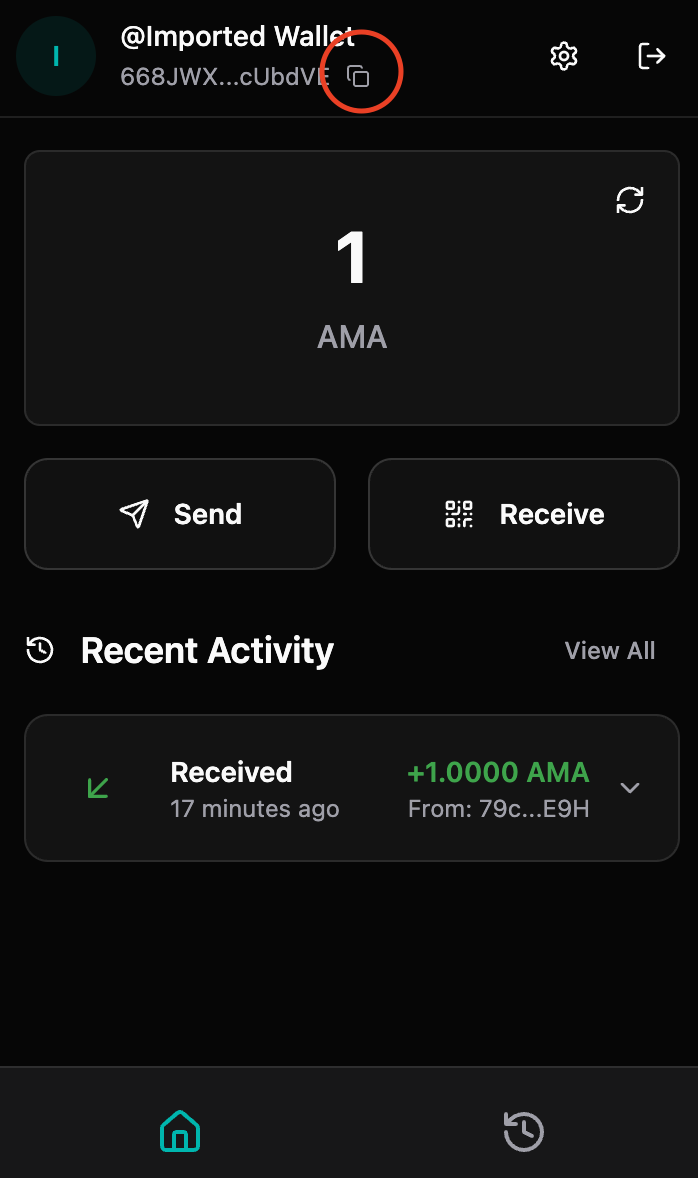
Method 1: From Header
- Open the Amadeus Wallet Extension
- Unlock your wallet if needed
- Your wallet address is displayed on the header
- Click the copy icon next to your address to copy it
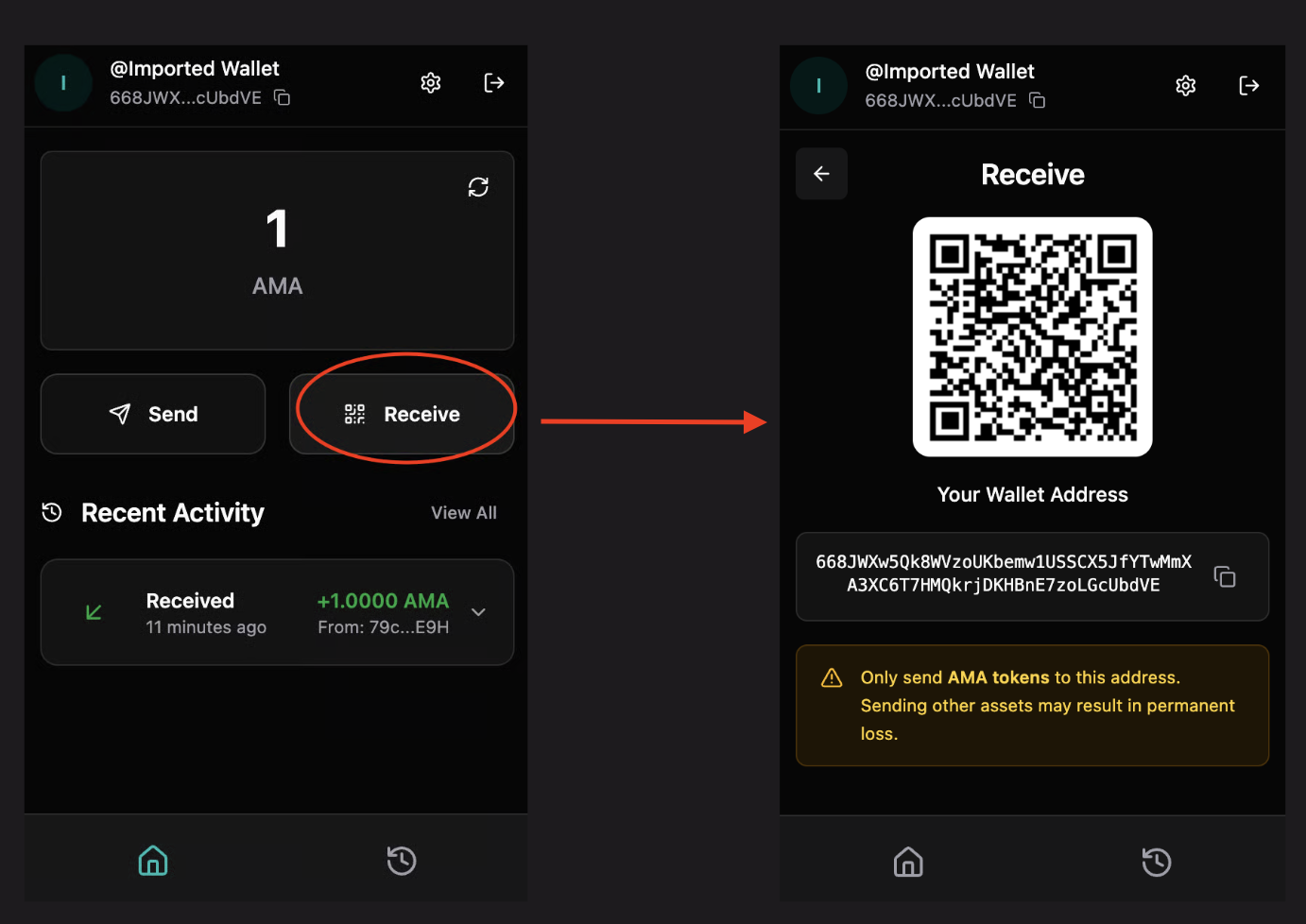
Method 2: From Receive Page
- Click "Receive" in the navigation menu
- Your wallet address and QR code will be displayed
- Click "Copy Address" to copy your address
Sharing Your Address
Option 1: Copy and Paste
- Copy your wallet address (using the copy button)
- Share it via:
- Messaging apps
- Social media
- Any communication method
Option 2: QR Code
- Go to the Receive page
- Show the QR code to the sender
- They can scan it with their wallet app
- This ensures accuracy and prevents typos
Option 3: Share QR Code Image
- Take a screenshot of your QR code
- Send the image to the sender
- They can scan it from the image
Address Format
Your wallet address:
- Is a long string of characters (Base58 encoded)
- Starts with specific characters depending on the network
- Is unique to your wallet
- Can be shared publicly (it's your public key)
Example format:
5KJvsngHeMoo884xkJ6Cyb5StvnRN6f9tYiqwqJzLpQq
QR Code
The QR code contains:
- Your wallet address
- Can be scanned by other wallet apps
- Ensures accurate address entry
- Faster than manual entry
Receiving Tokens
Step 1: Share Your Address
Share your wallet address or QR code with the sender using any method you prefer.
Step 2: Wait for Transaction
Once the sender initiates the transaction:
- You don't need to do anything
- Tokens will appear in your wallet automatically
- Transaction may take a few moments to confirm
Step 3: Verify Receipt
- Check your balance on the dashboard
- View the transaction in your transaction history
- Click the transaction to see details
- Verify the amount received matches what was sent
Transaction Confirmation
Transactions typically confirm quickly, but:
- Network congestion can cause delays
- You'll see the transaction as "pending" until confirmed
- Once confirmed, balance updates automatically
Security Considerations
Address Safety
- ✅ Safe to share: Your wallet address (public key) is safe to share publicly
- ✅ No risk: Sharing your address doesn't compromise your wallet security
- ✅ Public information: Addresses are meant to be shared
What NOT to Share
- ❌ Never share your Seed64
- ❌ Never share your password
- ❌ Never share your private key (if you have access to it)
Address Verification
When receiving tokens:
- Verify the sender's identity if receiving large amounts
- Double-check the amount matches expectations
- Confirm you're receiving on the correct network (Mainnet vs Testnet)
Multiple Addresses
- Each wallet has one primary address
- You can create multiple wallets for different purposes
- Each wallet has its own unique address
- Consider using different wallets for different use cases
Network Considerations
Mainnet vs Testnet
- Mainnet: Real tokens with real value
- Testnet: Test tokens with no value (for testing)
Ensure:
- You're receiving on the correct network
- The sender is using the same network
- Your address matches the network type
Troubleshooting
Tokens not appearing
Possible causes:
- Transaction still pending
- Wrong network selected
- Transaction failed
- Address mismatch
Solutions:
- Wait a few moments for confirmation
- Check transaction status in explorer
- Verify network settings match sender's network
- Ask sender for transaction hash to verify
Wrong network
If you received tokens on the wrong network:
- Check your network settings
- Switch to the correct network
- Tokens should appear once on correct network
- Note: You cannot transfer tokens between networks directly
Address format error
If sender reports address format error:
- Verify you copied the complete address
- Ensure no extra spaces or characters
- Share QR code instead for accuracy
- Double-check address starts with correct characters
Best Practices
- Verify Amount: Always verify the amount received matches expectations
- Check Network: Ensure you're on the correct network
- Use QR Code: QR codes prevent address entry errors
- Keep Records: Save transaction details for your records
- Verify Sender: For large amounts, verify sender identity